
Unlocking the Potential of Off-Page SEO: A Guide to Google Business Profile Optimization
Learn How Off-Page SEO and Google Business Profile Optimization Can Elevate Your Business
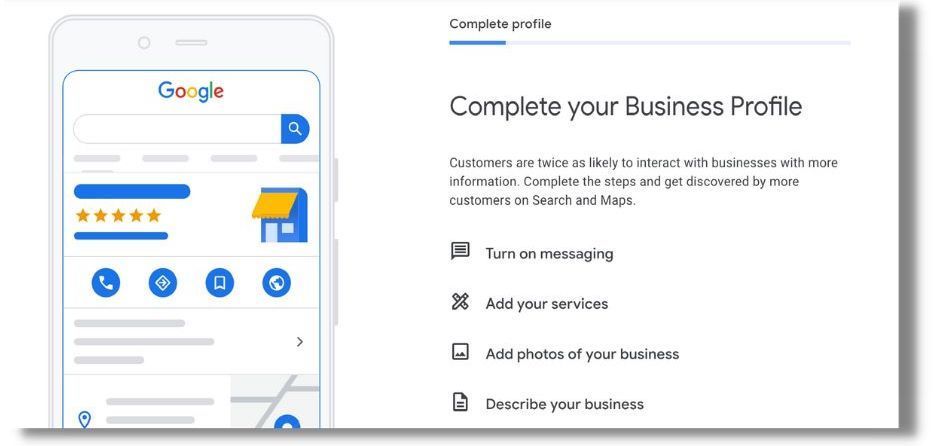
In the realm of Search Engine Optimization (SEO), "off-page" strategies often take a back seat to their "on-page" counterparts. However, they are equally important for elevating your website’s visibility on search engine results pages (SERPs). One of the most overlooked yet impactful tools for off-page SEO is the Google Business Profile (formerly Google My Business).
What is Off-Page SEO?
Off-page SEO refers to all the activities that you perform outside of your own website to improve its visibility and ranking on search engines. These activities can include link building, social media marketing, and influencer partnerships, among others. Unlike on-page SEO, which focuses on optimizing the content and technical aspects of your site, off-page SEO concentrates on building authority and relevance through external platforms and interactions.
Why is Google Business Profile Important for Off-Page SEO?
Google Business Profile serves as a digital storefront for local businesses. It provides a snapshot of your business – including name, address, phone number, website, hours of operation, and customer reviews – directly in the Google search results and Google Maps. Optimizing this listing can:
- Improve Local SEO: Your business appears in local search queries, targeting potential customers in your geographic area.
- Build Credibility: Customer reviews and ratings on your Google Business Profile build trust among prospective customers.
- Increase Visibility: A well-optimized profile is more likely to be featured in the "Local 3-Pack," the top three local business listings that appear for local search queries.
Optimizing Your Google Business Profile: First Steps
- Claim and Verify: If you haven’t already, claim your Google Business Profile and go through the verification process. This typically involves receiving a postcard with a code from Google to confirm your business address.
- Complete Every Section: Make sure all information fields are filled out accurately and comprehensively. The more information you provide, the better.
- Use High-Quality Images: Upload clear, high-resolution images of your business to make your listing more appealing. Include interior and exterior shots, as well as images of products or services.
- Manage and Respond to Reviews: Regularly encourage satisfied customers to leave reviews and always take the time to respond. This not only enhances your business’s credibility but also sends a positive signal to Google.
- Update Regularly: Business hours, services, and other details can change. Make sure your profile always reflects the most current information.
- Use Google Posts: This feature allows you to share updates, promotions, and events right on your Google Business Profile. It’s a great way to engage with your audience.
- Analyze and Adapt: Google provides insights into how people find and interact with your listing. Use this data to refine your profile and develop strategies for improved visibility.
Should You Hire an Agency to Manage Your Google Business Profile?
The simple answer is yes, hiring an agency to manage your Google Business Profile can be an invaluable investment for your business. While setting up and maintaining a Google Business Profile may initially appear straightforward, optimizing it for maximum visibility and engagement requires a nuanced understanding of SEO tactics, local search algorithms, and consumer behavior. An experienced agency, like GoBeRewarded, brings this expertise to the table and can conduct a thorough analysis of your current profile, identify areas for improvement, and implement advanced strategies you may not have considered. Additionally, agencies have the resources to consistently update your profile, respond to reviews, and analyze performance data. This ongoing attention ensures that your business maintains a strong, competitive presence in local search results, freeing you to focus on other aspects of your business.
While it’s easy to get caught up in the myriad of on-page SEO tactics, don’t underestimate the power of off-page SEO and, specifically, Google Business Profile optimization. By investing time in this valuable tool, you can significantly enhance your local search presence, build authority, and ultimately drive more traffic to both your digital and physical storefronts.